Quickstart
Stop your AI from re-figuring out your project every session. One command drops a durable protocol floor onto your workspace — about five minutes, one folder.
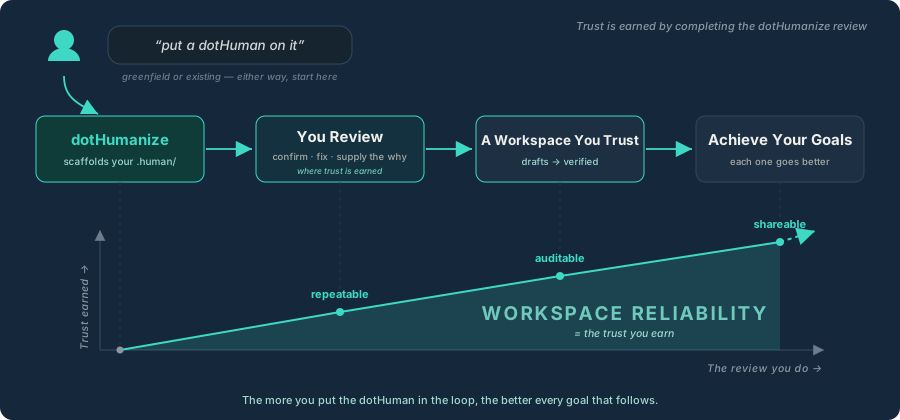
The setup move
The protocol stays a collection of concepts until you run it on a real codebase. You lay the workspace layer with a single pseudoskill called dotHumanize.
Point it at any local directory. It reads what's physically there, structures a plain-text workspace, and leaves your folder root completely clean — you don't write the floor by hand; dotHumanize drafts the structure and you supply the intent.
You need very little to start: an AI agent that can read and write files, Node.js, and a folder. Full list: Before You Begin.
Step by step
1 Get dotHumanize
Download the dotHumanize bundle and unzip its components into the root of the project you want to manage.
2 Invoke the command
Open your AI agent in your terminal or IDE and give it this instruction:
dotHumanize this repo
Plain prompts like "understand this repo" work identically — that's the entire instruction.
3 Let the scaffold build
dotHumanize scans your code, writes a plain-text .human/ folder at your root, then tucks its operational helpers away inside — leaving your project root clean. It maps your workspace into its pillars: Comprehension, a Captain's Log, your first Goals, Evergreen runbooks, and a Reports pillar.
4 Work through the review
The command hands you a grouped checklist inside your active Goals folder — and your workspace isn't trusted until you work through it. As the ramp above shows, that review is three moves — confirm · fix · supply the why:
- Confirm the facts the script proved — the structures, features, and dependencies it could verify.
- Fix the missteps — correct any inference it flagged with a
[review]tag. - Supply the why — fill the blank templates with the intent and background only you know.
It's resumable anytime, and every answer takes your .human/ from drafts to verified.
That's it. You've put a dotHuman on it.
What just happened
You went from a project your AI must re-learn from scratch every conversation to one anchored by a human-verified floor — a .human/ that survives context resets and that every future session inherits.
That reliability comes from a strict split:
- Facts are deterministic. A local script crawls your structure, layout, and dependencies, reporting only what it can prove — same project in, same facts out.
- Secrets stay out by design. The scanner reads environment-variable names (the keys in a
.env.example), never their values. - The why is yours. The agent fills fixed templates on a short leash; it can't invent the reasoning behind your code, so it leaves clearly-marked blanks for you to complete.
It's AI-assisted, not a guarantee — you review before anything ships (Disclaimer).
Good to know
- It's not just code. Drop it on a content or design folder, a brand-new empty repo (it interviews you instead of scanning), or a root full of subprojects — it adapts to whatever it finds.
- Re-run anytime. Run it again later and it's built to show you what changed rather than overwrite the intent you've supplied.
Next steps
- Begin your first goal. dotHumanize offers a few next goals based on what it found (e.g. "no tests yet"). Pick one and run it the dotHuman way: spec → plan → tasks.
- Understand the compounding loop. See how each session feeds your institutional memory in The Lifecycle.
- Explore the script's rules. Dive into the mechanics on the full dotHumanize page.
Last updated