How dotHuman Works
The protocol works by turning transient conversational context into durable, structured files that live with your project. The premise is simple: if an AI agent can read your code, it can read the rules of your workspace.
Just want to run it? The Quickstart puts a dotHuman on a real project in about five minutes. This page is for understanding how it works. (For the pains it clears up, see Pain Points We Solve.)
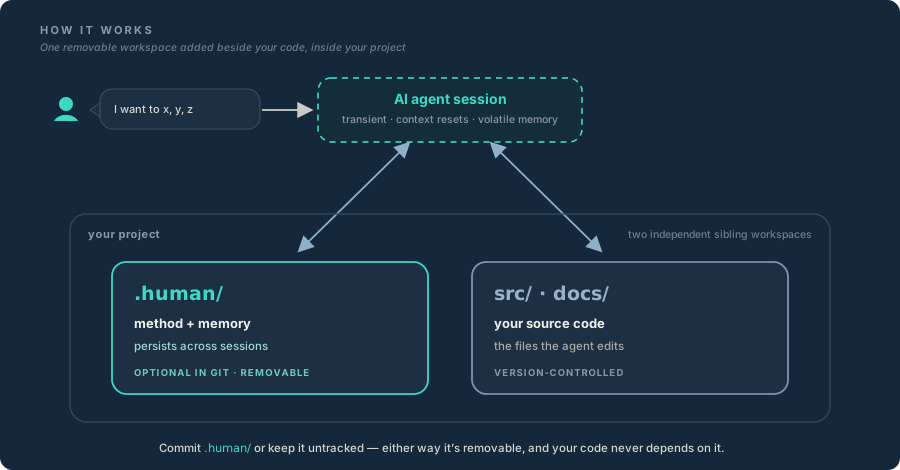
The two engines
dotHuman works through two intersecting mechanics: a fixed structural floor — the .human/ workspace — and a compounding engine — the lifecycle that matures it.
1. The structural floor — the .human/ workspace
Instead of making an agent guess your project's boundaries or absorb a long system prompt, dotHuman drops a standardized, plain-text .human/ folder into your project root, mapping your working method into five explicit pillars.
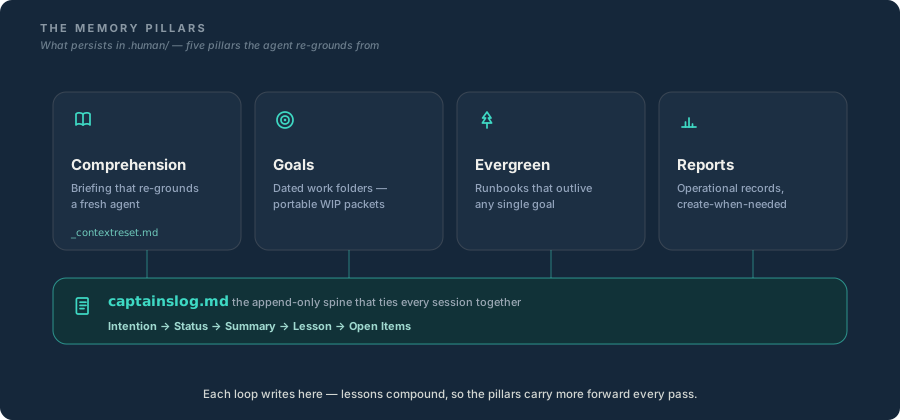
Each is a plain-text home for one kind of durable knowledge:
- Comprehension — the standing briefing that grounds a fresh agent.
- Goals — dated, self-contained work folders, each pursued through spec → plan → tasks.
- Evergreen — long-lived runbooks and how-tos that outlive any single goal.
- Reports — time-stamped operational records (incidents, alarms), created only when there's something to record.
- Captain's Log — the append-only spine beneath those four folders, tying every session together.
2. The compounding engine — the lifecycle
The files in your workspace aren't static templates; they're a living system that matures as work gets done. Every goal runs the same loop:
open a goal → spec → plan → execute → review & sign off → carry forward
When a goal is done, the agent doesn't just close it and forget. It writes the hard-won lessons into the Captain's Log and promotes the repeatable ones into Evergreen runbooks — so the next agent thread inherits those compounded lessons instead of relearning them. That's the Lifecycle.
Where to go next
- Learn by doing — drop a dotHuman on a real project in about five minutes: Quickstart.
- Master the mechanics — the execution loop behind every goal: The Lifecycle.
Related
- dotHumanize — lays the floor
- The Two Layers
- Naming — telling dotHuman, .human, and .human/ apart
Last updated